
Chapter 7 · 7.13
Send limits and the 'message limit reached' message
To prevent abuse, WebOké applies a maximum to the number of e-mails you can send per day. By default, this is 300 e-mails per day per package. With normal use, you won't notice this at all. If you go over it, any further mail that day will be rejected.
Why is there a limit?
Unfortunately, it happens regularly that a mailbox with a leaked password or a poorly secured contact form is misused to send spam. Without a limit, this could be thousands of messages per hour, which would get the server blacklisted. That would mean mail from all customers on that server would be delivered less reliably. The limit reduces the damage and is a signal to us that something might be wrong.
What counts towards the limit?
- All mail you send from your mailboxes, via your mail program or webmail.
- Mail sent by your website, such as contact forms, order confirmations from your webshop and password e-mails.
- Automatic replies (autoresponders and holiday messages) and mail sent out by a mailing list.
Checking how much you've sent
Go to User statistics (in the menu under System Info & Files). Next to Sent E-mails (1), you'll see how many e-mails have been sent today and what the limit is, for example 0 / 300.
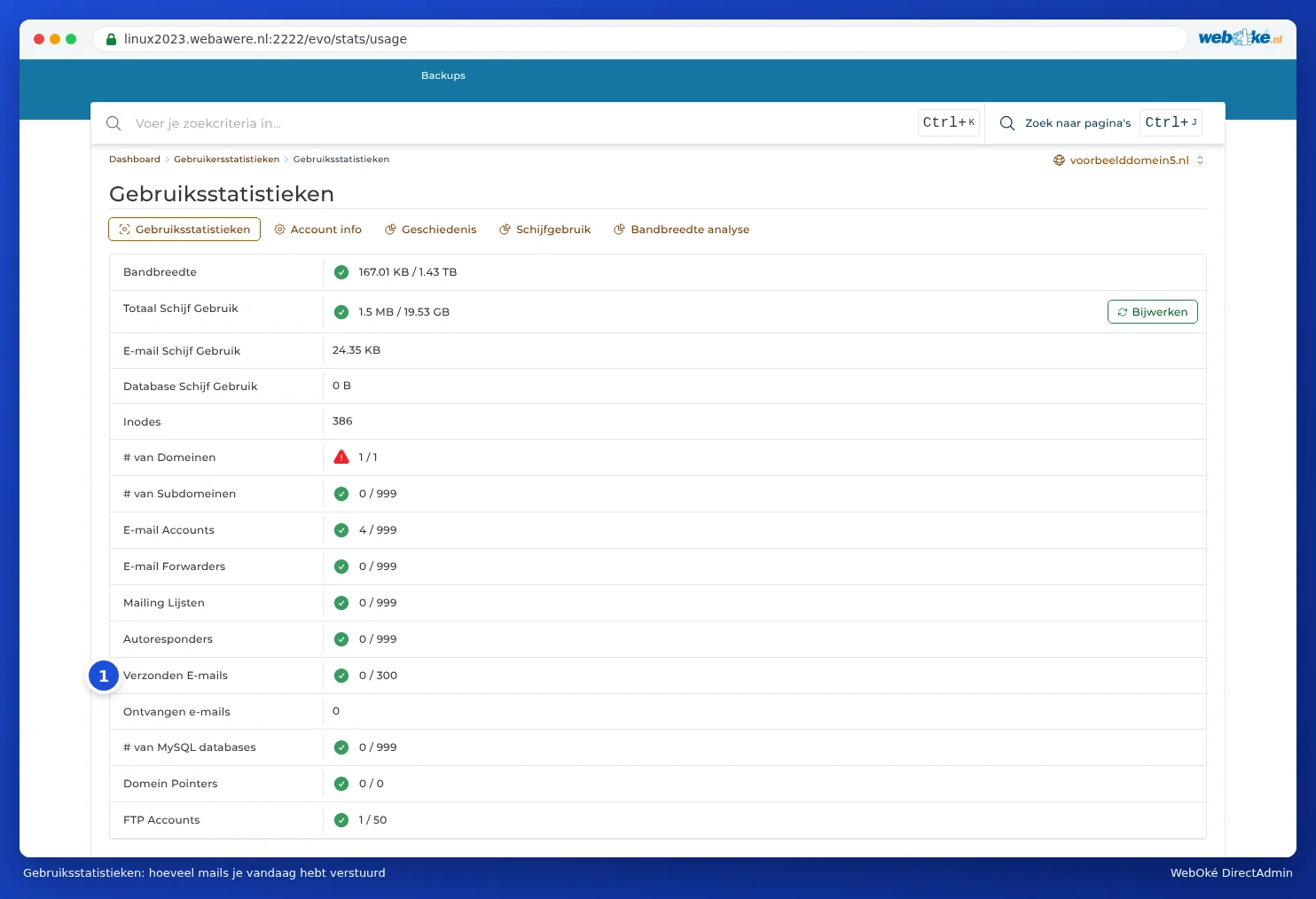
Under E-mail Accounts, you'll see in the Sent column how many e-mails each mailbox has sent today. Want to know exactly what was sent, by whom and to whom? Click on E-mail Usage next to E-mail Accounts.

At the top, you choose the period (Present, This Month) and the direction (Outbound or Inbound). Use PHP SCRIPTS to view mail sent by your website itself, such as messages from contact forms. The Authentication column shows which mailbox was used to log in to send the mail.
The 'message limit reached' message
If you've gone over the limit, your mail will bounce back with an error message. It will say something like:
- You (username) have reached your message limit
- XX emails have been sent yesterday by username
- or sometimes just Unrouteable address or Mail delivery failed: returning message to sender.
The counter resets to zero every night. So you can send mail again the next day. Rejected mail isn't automatically resent, so resend any important messages yourself the next day.
What to do if you get this message
- Check whether you really sent that mail. Open E-mail Usage and look at today's sent messages. Do you see mail you don't recognise, for example to unknown addresses or with a strange sender? Then your package is probably being misused.
- In case of misuse: immediately change the password of the mailbox shown under Authentication (see Changing the password of an email address). If the mail comes from a PHP script, the leak is in your website, for example a form without spam protection or an outdated plugin. Read What to do if your e-mail address has been misused and get in touch with us.
- Did you send it yourself and do you need more? Contact support. For a good reason, we'll raise the limit. If you want to send a newsletter or mailing, it's better to use a service like Laposta, Brevo or Mailchimp: bulk mail is delivered better there, and they handle unsubscribing and statistics for you.
Limit per mailbox
You can also set your own limit per mailbox, with Daily Send Limit when creating it or via Change Limits (see Storage per mailbox and what happens when it's full). This limits the damage if that one mailbox is misused. If you leave it at Max (in the Change Limits window, this checkbox is called Unlimited), only the package limit applies. If you enter a higher number for a mailbox than your package allows, DirectAdmin will show a message like De verzend limiet voor ... is 1000, dit overschrijdt het e-mail limiet. This is just a message about the setting; nothing extra has been sent. In that case, tick Max or Unlimited again, or enter a lower number.
You can read more about mail being rejected in Verzenden geweigerd: blacklists en limieten and Ik kan geen e-mail versturen.