
Error: To change this page, upload a new index.html to your private folder
In this article we explain what you can do if you see the error 'To change this page, upload a new index.html to your private folder' on your domain.
This error can occur with hosting packages that have existed for a while.
Until a few years ago, the public_html folder was accessed for HTTP connections and the private_html folder for HTTPS connections, so these two existed side by side.
When you have files in the public_html folder but are using a secure HTTPS connection with an SSL certificate (which is standard nowadays), your website files may not be found because they are not in the private_html folder.
Fortunately, this is easy to fix, which we'll explain step by step:
Step 1 - Go to My Products on WebOke.nl and click on 'Open DirectAdmin Control Panel'
Step 2 - Click on 'Domain Setup'

Step 3 - Click on your domain name

Step 4 - Click on 'Use a symlink from private_html to public_html'
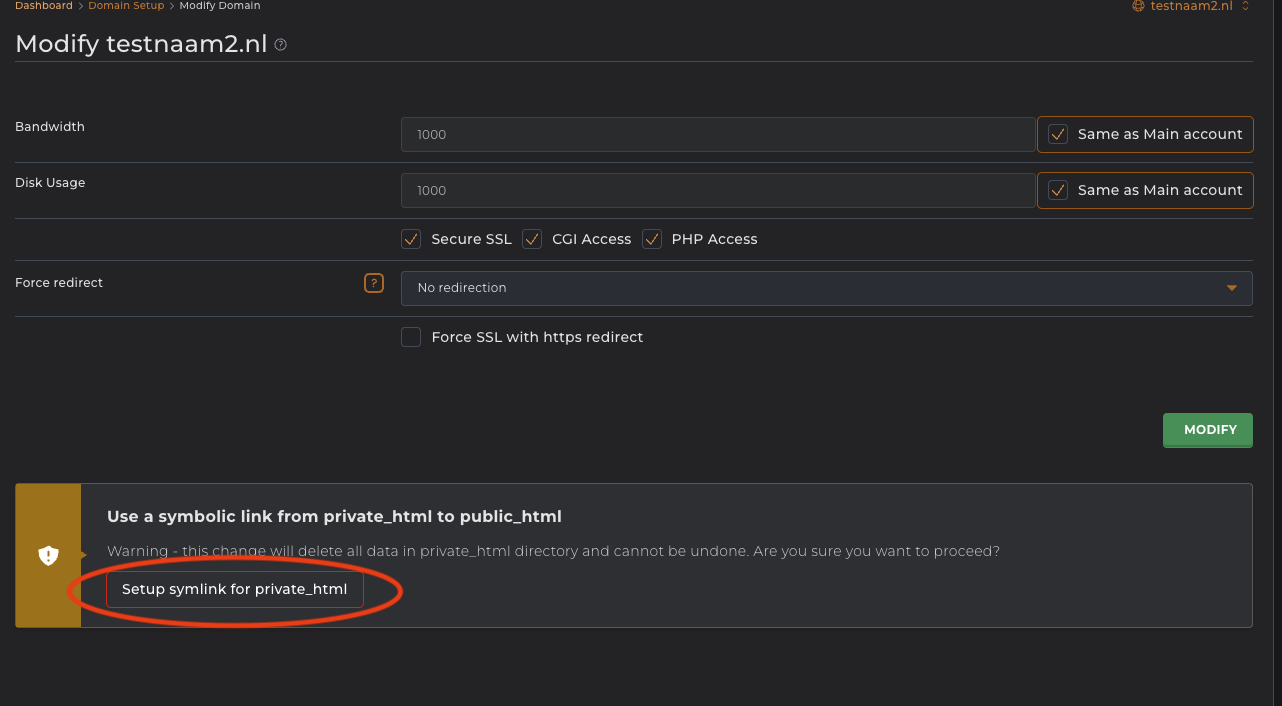
That's it! You might still see the error message due to your browser cache. In a private window or different browser, the error message should be gone.