
Activating Node.js in DirectAdmin
In DirectAdmin you can activate Node.js for several versions. If one is missing, let us know and we will see whether we can add it.
1. In DirectAdmin, choose Setup Node.js App.
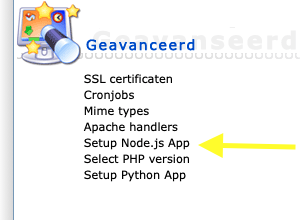
2. On the next screen, click Create Application.

3. On this screen you can replace test2028.webawere.nl with your own domain name and testnodejs with the location where you want Node.js to be accessible. You can also leave it empty, in which case it is accessible via https://test2028.webawere.nl.
4. Click Create to create the Node.js app.

4. Then go to the URL you entered in your browser to test whether it works.

5. If you have a business package, you can also log in to the server via SSH (always port 1967) and enter the command below (run the command) to activate your virtualenv.
